
🪟 Windows PC ━━━━━🚀 ━━━━━▶ 🍏 Mac OS
I have been using a Mac for just over a month, and honestly, I was hitting a wall.
Don’t get me wrong, macOS is brilliant hardware, but modifying it to fit a power-user workflow coming from Windows requires downloading a mountain of tiny, single-purpose utilities. Three weeks ago, I managed to score an absolute deal of a lifetime on eBay: a used 16GB M3 MacBook Air for just $350. It was a massive upgrade from my M3 iPad Air, which had been my only Apple device.
But as a student from Kenya on an incredibly strict budget, I quickly ran into a massive problem. I cannot afford premium macOS apps. To put things in perspective, 10 dollars buys my food for an entire week. So, I turned to the open-source world, downloading every free single-purpose utility I could find to make macOS behave the way I wanted.
By week four, I was suffering from severe “permission fatigue” and system slowdowns. I was tired of giving 20+ separate sketchy apps Accessibility and Screen Recording permissions. Worse, they started conflicting, crashing, and eating up my RAM. It got so bad that my screen recording app at the time was completely blocked from launching due to permission overlap.
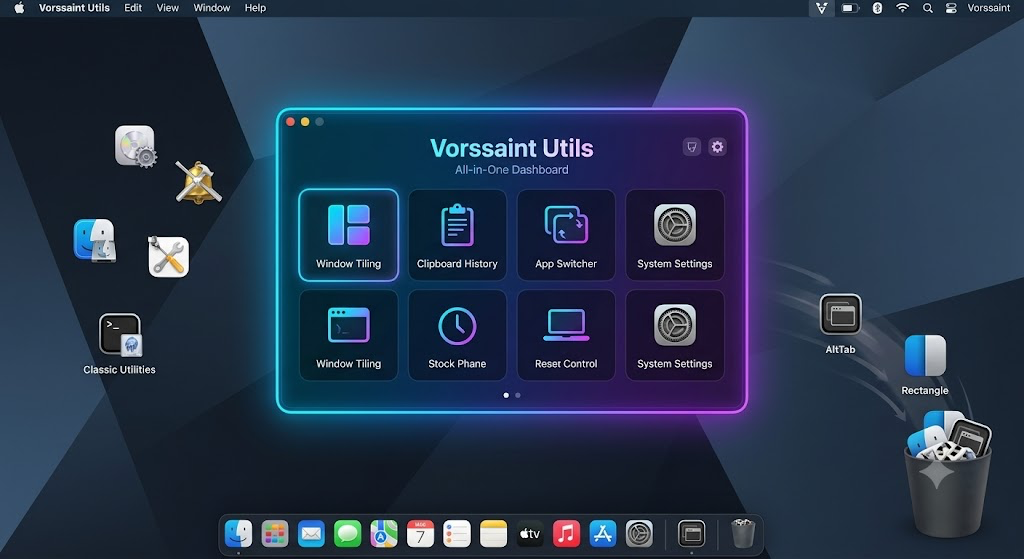
Then, three days ago, I found it. An ultra-powerful, wildly overpowered (OP) free application called Vorssaint — the modular Swiss Army knife for macOS.
In less than an hour, I uninstalled 10 separate applications because this single utility absorbed all of their jobs seamlessly from one control center.

Here is the breakdown of the apps I successfully nuked, where this “God App” still falls short, and the ultimate feature request list the developer needs to implement to make it perfect.
The “Thanos Snap”: 10 Apps I Instantly Replaced
Having one unified app handle my background tasks drastically improved my Mac’s battery life, freed up my squeezed system memory, and eliminated UI stuttering.
Plaintext
 [📉 System RAM Stress Breakdown]

 BEFORE (10+ Glitchy Utilities running): [████████████████████] 95% RAM Used (Crashes and Glitches)

 AFTER (Unified Vorssaint Setup):        [██████] 35% RAM Used (Silky Smooth)
Vorssaint completely absorbed the functionalities of these 10 tools:
| App Replaced | Core Feature Absorbed By Vorssaint |
| LinearMouse | Smooth scrolling & trackpad scroll direction inversion. |
| Mac Mouse Fix | Extra mouse button remapping and custom mouse click assignments. |
| Dockdoor | Live hover window previews directly when mousing over the Dock. |
| AltTab & Altar | The rich ⌘+Tab overlay with live window previews. |
| Swift Quit | Automatically quitting apps fully when their last window is closed. |
| Quitter | Automatically hiding or quitting inactive background apps after a timeout. |
| Command X | Fixing the native Finder cut-and-paste file routing using ⌘+X. |
| Menuist | Clean menu bar file management and fast path movement utilities. |
| Dropover | The built-in temporary shelf for shaking and staging drag-and-drop files. |
| Black Music App | Native per-app volume mixing and isolated audio channel routing. |
Where It Falls Short: My Feature Requests
As much as I love this app, it isn’t perfect yet. Because it’s trying to do everything under one roof, it misses out on some of the deep, granular features found in dedicated niche apps.
Here is my open letter and feature request list to make this the undisputed king of free macOS utilities so I can clean up my drive for good:
1. Clipboard Notification Sounds (Like Maccy)
I use ClipRelay to sync my clipboard from my Android phone directly over to my Mac. I really need an audio cue—a subtle “pop” or “click”—when an item successfully hits the clipboard history or when I paste. It lets me know a background sync or copy worked without me having to visually check. Right now, I’m forced to keep Maccy installed just for this audio feedback.
2. Borrow the Best “OnlySwitch” Features
I don’t care about the widgets in OnlySwitch, but I am keeping it installed purely for two essential utilities:
- Hide Desktop Icons: An instant menu bar toggle to clean up cluttered desktop files for clean presentations or screenshots.
- Screen Test & Clean Mode: A feature that boots a pure-color, full-screen view (swapping black, white, red, green, blue) to safely wipe off screen stains without accidentally clicking layout elements, or to check for dead pixels.
3. Menu Bar UI Overhaul
The app runs great, but the visuals need a premium coat of paint:
- The icons look slightly pixelated on the menu bar compared to native Apple system icons.
- The storage icon is a bit dull. I currently keep ClearDisk around simply because its menu-bar UI is much more interesting to look at.
- Battery Icon Idea: Make the battery logo dynamically change colors (Green for charged, Yellow for medium, Red for low) based on juice, and put the percentage number inside the logo frame to save precious horizontal menu bar space. Let’s make the drop-down UI colorful!
Plaintext
  [🔋 UI Concept: Menu Bar Space Saver]
  Current:  [Battery Icon] 87%  (Takes up too much space)

  Proposed: [ 87% ]             (Percentage nested inside a dynamic color icon)
4. App Switcher Trackpad Gestures
Please add a 3-finger swipe (left or right) to open and cycle the ⌘+Tab menu! If you add this simple touch functionality (similar to what Touch-Tab or Windowbunny does), I could uninstall another app from my system.
5. Smarter Window Switching & Layouts (The Rectangle Conflict)
Window management needs to respect my specific layout: I keep my macOS Dock on the right side of the screen, and window layouts need to respect that boundary.
More importantly, I map my window snapping to a Hyperkey (Caps Lock + Shift and Option + directional keys). In Rectangle, I can hit the exact same shortcut twice to cycle through layout sizes (e.g., snapping to 1/2 screen, then hitting it again to stretch to 2/3 screen). Vorssaint currently throws an error saying I “cannot assign a duplicate shortcut.” Because of this limitation, Rectangle stays.
6. God-Tier Shortcut Management
Draw deep inspiration from power-user tools like Better and Better or WarpKey. The current shortcut manager is decent, but it needs to handle hyperkey routing and deep, multi-layered mouse macros flawlessly.
7. Native “Right-Click to Uninstall”
If you add a contextual right-click menu extension in Finder to deeply uninstall applications and wipe their hidden library cache files, I could finally ditch Pearcleaner.
8. AutoRaise Integration
Please integrate focus-follows-mouse functionality natively, similar to the open-source AutoRaise project, where hovering over a background window brings it into active focus without an explicit click.
9. Widget Support (For Desktop Toggles)
While I don’t personally use desktop widgets, adding support for native macOS wallpaper widgets to place custom system toggles and monitoring graphs directly on the desktop background (like OnlySwitch does) would be a massive selling point for customization fans.
10. The Missing “Slow Quit” Feature
Bring in an intentional delay feature (holding down ⌘+Q for a second) so users don’t accidentally close out of massive, ongoing browser sessions or school projects with a stray keystroke.
11. “Pause Mac” / Pomodoro Mode
A focus toggle that allows you to temporarily pause notifications, block distracting applications, or run an active productivity timer (inspired by the Pause app on the App Store) would make this a productivity monster.
12. Open Mission Control Integration
Bake in a clean native trigger to deploy macOS Mission Control smoothly via custom shortcuts or mouse clicks without relying on external scripts or apps like OpenMissionControl.
13. UI Monitoring Inspiration from Stats
The monitoring features are functional, but the visual UI from the open-source Stats app is vastly superior. A visual refresh to match those clean, modern system graphs would be amazing.
The Survivors: The Apps I Am Keeping For Now
While Vorssaint cleared out a massive chunk of clutter, my Mac setup isn’t completely unified yet. Here is the survival list of apps I am still running alongside it to fill in those missing power features:
- OnlySwitch: Keeping it exclusively for desktop hiding and screen cleaning modes.
- Pearcleaner & ClearDisk: Pearcleaner remains the GOAT for deep right-click uninstalls, and ClearDisk has the better visual storage layout.
- Maccy: Still active strictly because it provides the tactical copy/paste sound cues I need for my Android-to-Mac workflow.
- Rectangle, Touch-Tab, Better and Better, & WarpKey: Staying on my drive until the shortcut layout cycling and trackpad gesture engines in Vorssaint get an upgrade.
- AutoRaise: Kept for focus-follows-mouse movement.
- Pause: My go-to app for Pomodoro focus blocks.
Final Thoughts

Finding a completely free, open-source utility that successfully kills 10 separate background apps with one stone is incredibly rare in the Mac ecosystem. It has rescued my M3 MacBook’s system RAM, cleaned up my menu bar, and put a stop to the endless permission crashes.
If the developer implements even half of these power-user features, Vorssaint will go from being a hidden gem to an absolutely mandatory installation for every single Mac user on the planet.

Leave a Reply